





































































Installments
Minimum amount for installment is 500 L.E


| Months | Monthly installment | Overall Cost | |
| 12 | 87 EGP | 1,046 EGP | |
| 18 | 60 EGP | 1,083 EGP |
| Months | Monthly installment | Overall Cost | |
| 12 | 88 EGP | 1,056 EGP | |
| 18 | 62 EGP | 1,113 EGP | |
| 24 | 49 EGP | 1,166 EGP | |
| 36 | 35 EGP | 1,268 EGP |
| Months | Monthly installment | Overall Cost | |
| 6 | 155 EGP | 930 EGP | |
| 12 | 89 EGP | 1,064 EGP |
| Months | Monthly installment | Overall Cost | |
| 12 | 92 EGP | 1,102 EGP | |
| 18 | 65 EGP | 1,168 EGP | |
| 24 | 52 EGP | 1,246 EGP |
| Months | Monthly installment | Overall Cost | |
| 6 | 155 EGP | 930 EGP | |
| 12 | 79 EGP | 948 EGP | |
| 18 | 53 EGP | 948 EGP | |
| 24 | 40 EGP | 948 EGP | |
| 36 | 26 EGP | 948 EGP |
| Months | Monthly installment | Overall Cost | |
| 12 | 90 EGP | 1,083 EGP |
| Months | Monthly installment | Overall Cost | |
| 12 | 88 EGP | 1,050 EGP | |
| 18 | 60 EGP | 1,088 EGP | |
| 24 | 47 EGP | 1,139 EGP |
| Months | Monthly installment | Overall Cost | |
| 6 | 155 EGP | 930 EGP | |
| 9 | 115 EGP | 1,036 EGP | |
| 10 | 105 EGP | 1,046 EGP | |
| 12 | 89 EGP | 1,074 EGP | |
| 18 | 62 EGP | 1,118 EGP | |
| 36 | 35 EGP | 1,251 EGP |
| Months | Monthly installment | Overall Cost | |
| 12 | 90 EGP | 1,083 EGP | |
| 18 | 64 EGP | 1,148 EGP | |
| 24 | 51 EGP | 1,218 EGP |
| Months | Monthly installment | Overall Cost | |
| 6 | 155 EGP | 930 EGP | |
| 12 | 87 EGP | 1,046 EGP |
| Months | Monthly installment | Overall Cost | |
| 12 | 85 EGP | 1,023 EGP | |
| 24 | 44 EGP | 1,060 EGP |
- Stock: Out Of Stock
Note : For cib installment from 12 to 36 month interest calculated by bank
'Check in-store availability
×This game is available in 0 stores and can also be delivered to your home with cash-on-delivery option.
Store Madinty
Shop G ground Floor All Season Park Mall Madinty- Egypt
Ready for Pick Up On: Today
Store Working Hours:
Saturday to Wednesday: 10:00 AM – 10:00 PM
Thursday & Friday: 10:00 AM – 12:00 Midnight
غير متاح حالياً
Warehouse Fifth Settlement
21 Hay 4 District 3 Fifth Settlement New Cairo - Egypt
Ready for Pick Up On: Today
Store Working Hours: Saturday to Thursday 9:00AM - 5:00PM
غير متاح حالياً
Store Arabella
Shop LL-10 beside Mahmoud El Far Market -Arabella Mall Fifth Settlement New Cairo - Egypt
Ready for Pick Up On: Today
Store Working Hours:
Saturday to Wednesday: 10:00 AM – 11:00 PM
Thursday & Friday: 10:00 AM – 12:00 Midnight
غير متاح حالياً
Store Mall Of Arab
Shop G285 Near Gate 23 - Mall of Arabia 6 October City - Egypt
Ready for Pick Up On: Today
Store Working Hours:
Saturday to Wednesday: 10:00 AM – 11:00 PM
Thursday & Friday: 10:00 AM – 12:00 Midnight
غير متاح حالياً
More from this brand


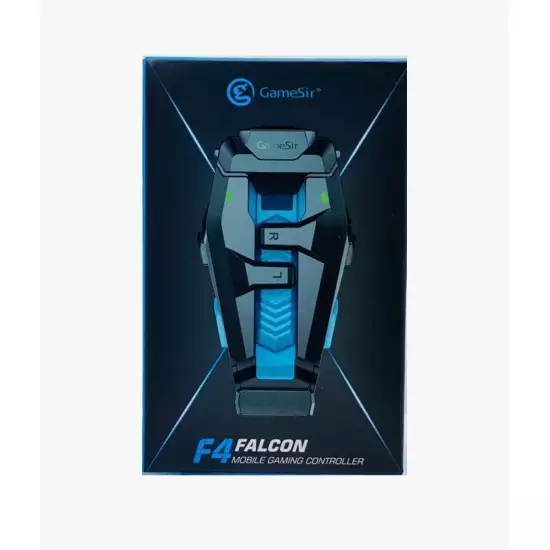
GameSir F4 Falcon Mobile Gaming Controller – Foldable Capacitive Trigger Grip for iPhone & Android (Open Sealed)
Description
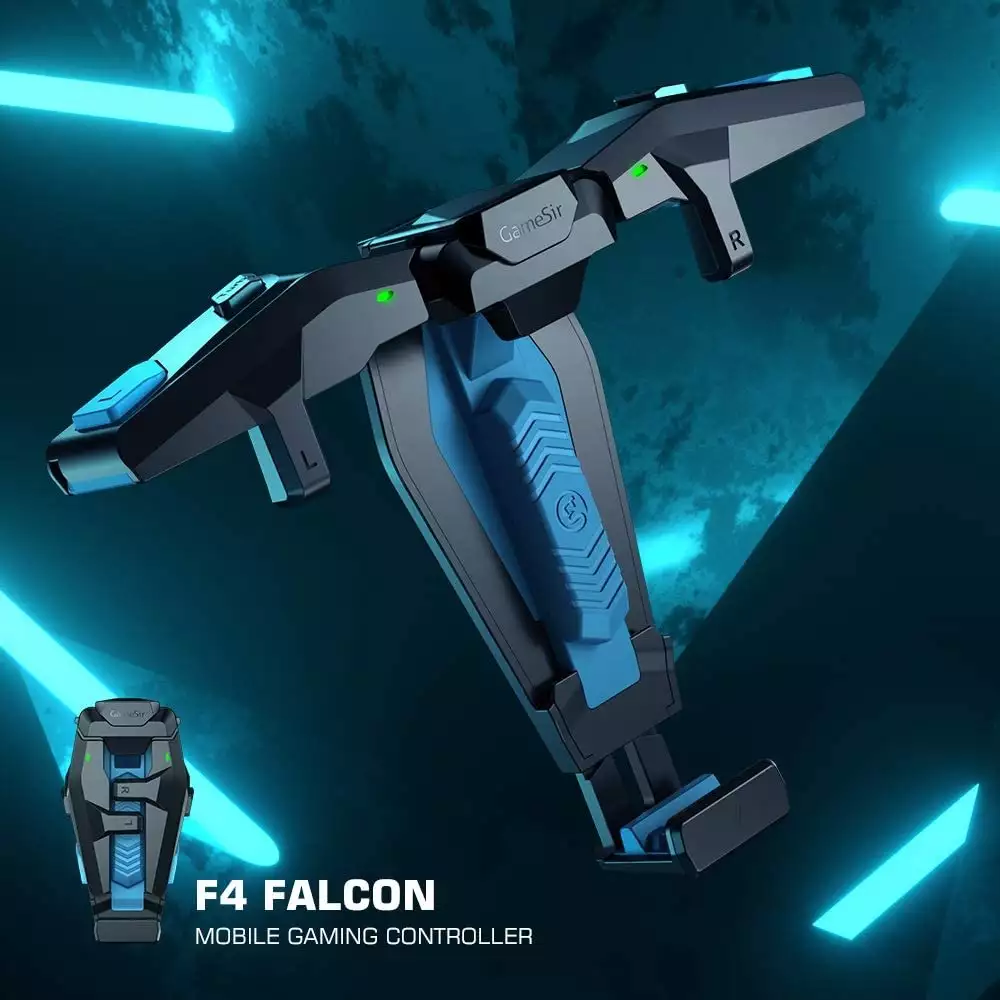
The GameSir F4 Falcon is a compact mobile gaming controller that adds two physical shoulder triggers to compatible iPhone and Android smartphones. It operates through capacitive contact points positioned over the game’s on-screen controls, so it does not require Bluetooth pairing, a companion application or complicated button-mapping software.
Its foldable design makes it convenient for mobile games such as Call of Duty: Mobile and PUBG Mobile. The left and right triggers can be positioned over commonly used actions such as aiming and firing, allowing players to perform these commands while keeping their thumbs available for movement and camera control.
Key Features
- Two physical shoulder triggers
- Compatible with iPhone and Android smartphones
- No Bluetooth connection required
- No companion application required
- Plug-and-play capacitive operation
- Works with customizable on-screen controls
- Suitable for shooting and action games
- Normal and burst-trigger modes
- Low-latency direct screen activation
- Foldable pocket-sized design
- Adjustable phone grip
- Does not block the main display area
- Rechargeable internal battery
- USB charging
- No phone battery consumption through Bluetooth
- Color: Black
- Condition: Open Sealed
Two Physical Shoulder Triggers
The F4 Falcon adds left and right shoulder buttons to a touchscreen gaming setup. Each trigger operates a capacitive contact positioned over an assigned on-screen button.
The triggers can be mapped to actions such as:
- Aim down sights
- Fire
- Crouch
- Jump
- Reload
- Scope activation
- Ability activation
- Other movable touchscreen commands
The controller does not electronically remap the game. Instead, the user moves the game’s on-screen buttons beneath the physical contact points.
No Bluetooth or Application Required
The controller communicates directly with the touchscreen through its capacitive contacts. It does not need to be paired through the phone’s Bluetooth settings and does not require a GameSir application.
This provides:
- Fast setup
- No wireless pairing delay
- No background mapping software
- No additional mobile permissions
- Broad compatibility with supported touchscreen games
- Easy switching between different phones
The controller’s internal battery powers its trigger and burst functions; it does not create a Bluetooth connection to the phone.
Normal and Burst Modes
The F4 Falcon supports standard single-press activation as well as rapid-fire or burst modes. Depending on the selected setting, one physical press can generate repeated touchscreen activation.
Available modes may include:
- Single activation
- Three-shot burst
- Six-shot burst
- Nine-shot burst
Burst-mode behavior depends on the game’s firing mechanics, weapon type, frame rate and touchscreen response. Some games or competitive modes may restrict rapid-fire accessories, so users should review the applicable game rules before enabling burst functions.
Designed for Mobile Shooting Games
The physical triggers can make touchscreen shooters more comfortable by allowing multiple actions simultaneously.
For example:
- Left thumb controls movement.
- Right thumb controls camera direction.
- Left trigger activates aiming.
- Right trigger activates firing.
This four-finger control arrangement can reduce the need to move a thumb between aiming, firing and camera controls.
Compatible Games
The F4 Falcon is suitable for touchscreen games with movable or customizable on-screen buttons, including titles such as:
- Call of Duty: Mobile
- PUBG Mobile
- Free Fire
- Fortnite Mobile, where available
- Knives Out
- Rules of Survival
- Other compatible shooting and action games
Compatibility is determined by the game’s touchscreen layout. It may not work properly with games that use fixed controls or prevent buttons from being repositioned.
Foldable Portable Design
The side grips fold inward when the controller is not in use, making it easier to carry in a pocket, backpack or mobile-accessory case.
When unfolded, the grips hold the smartphone while positioning the trigger contacts near the top corners of the display.
Adjustable Smartphone Fit
The controller is designed for a range of compatible iPhone and Android models. Actual fit depends on:
- Phone width
- Phone thickness
- Camera-bump position
- Screen-edge shape
- Installed case
- Screen-protector thickness
Thick protective cases may prevent the capacitive contacts from touching the screen correctly. Removing the phone case may be required.
Rechargeable Operation
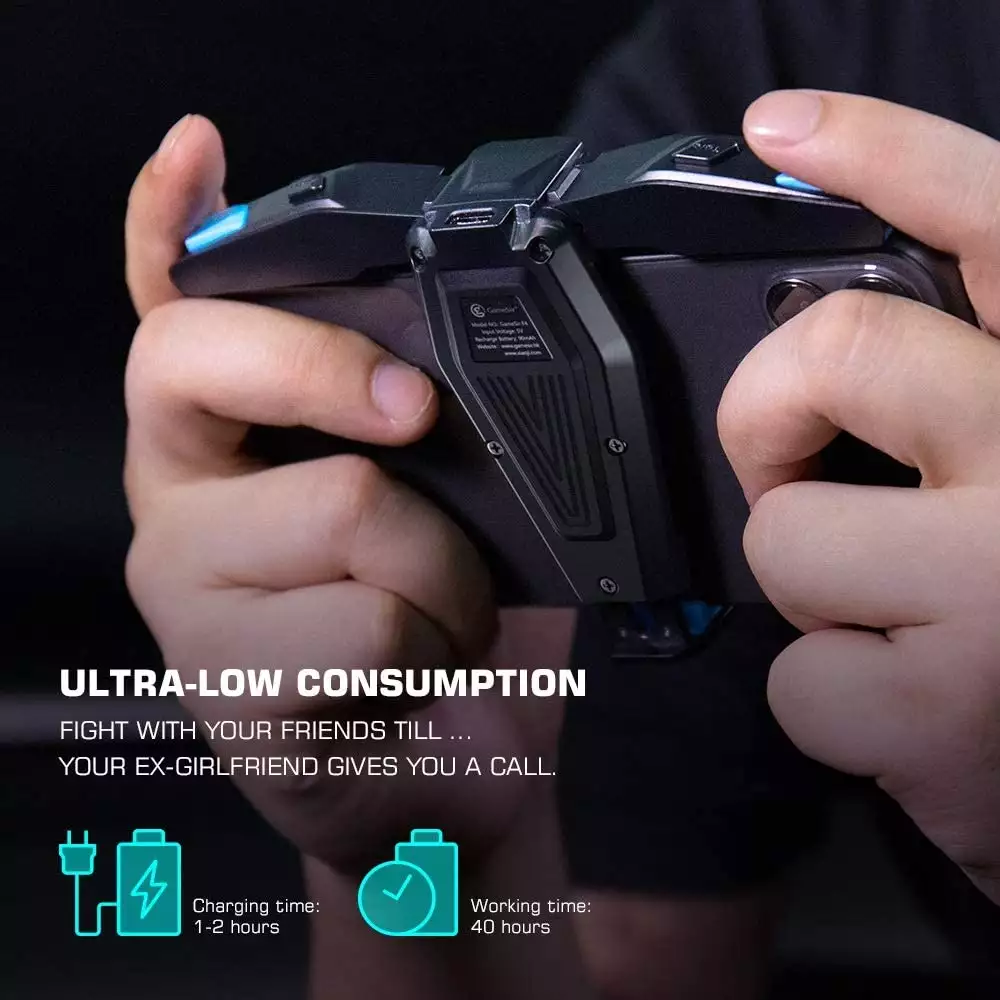
The controller contains a rechargeable battery that powers its capacitive-pulse and burst functionality. It can be recharged using the supplied USB cable.
Battery runtime varies with:
- Selected burst mode
- Frequency of trigger use
- Battery age
- Charging conditions
- Storage temperature
The phone does not need to supply power directly to the controller during gameplay.
Specifications
| Specification | Details |
|---|---|
| Brand | GameSir |
| Model | F4 Falcon |
| Product Type | Mobile gaming trigger controller |
| Trigger Count | Two |
| Trigger Position | Left and right shoulder |
| Operating Method | Capacitive touchscreen contact |
| Bluetooth Required | No |
| Application Required | No |
| Button-Mapping Software Required | No |
| Normal Trigger Mode | Yes |
| Burst Modes | Yes |
| Compatible Platforms | iOS and Android |
| Supported Devices | Compatible smartphones |
| Supported Games | Games with adjustable touchscreen controls |
| Internal Battery | Rechargeable |
| Charging Connection | USB |
| Phone Connection | No electronic connection required |
| Foldable Design | Yes |
| Color | Black |
| Phone Included | No |
| Condition | Open Sealed |
Installation and Setup
- Charge the F4 Falcon before first use.
- Unfold both sides of the controller.
- Place the smartphone securely inside the grip.
- Launch the desired mobile game.
- Open the game’s control-layout settings.
- Move the aiming button beneath one capacitive contact.
- Move the firing button beneath the other contact.
- Save the control layout.
- Test both physical triggers.
- Select normal or burst mode as required.
- Adjust the on-screen button position if activation is inconsistent.
The capacitive contacts must sit directly over the selected touchscreen controls.
Package Contents
The original package is expected to include:
- GameSir F4 Falcon mobile gaming controller
- USB charging cable
- User documentation
- Original internal packaging
The smartphone, wall charger and other gaming accessories are not included.
Open Sealed Inspection Checklist
Because this unit is sold as Open Sealed, verify the following:
- Confirm the model is GameSir F4 Falcon.
- Inspect the body for cracks or heavy scratches.
- Check both folding arms and hinges.
- Verify that both sides open and close smoothly.
- Check that the phone-gripping surfaces are present.
- Inspect both capacitive contact pads.
- Confirm that neither contact is bent or loose.
- Press both shoulder triggers and check their movement.
- Test normal single-press activation.
- Test each available burst mode.
- Confirm both triggers activate the correct screen positions.
- Test the controller with a compatible iPhone or Android phone.
- Check that the phone sits securely in the grip.
- Verify that the controller does not press the phone’s side buttons.
- Check compatibility with and without the phone case.
- Inspect the charging port for damage.
- Confirm the internal battery accepts a charge.
- Test the battery for abnormal heat or rapid discharge.
- Verify that the USB charging cable is included.
- Inspect the original box and packaging.
- Confirm seller warranty coverage separately.
Important Notes
- The F4 Falcon does not function like a Bluetooth gamepad.
- It does not add analog sticks or a directional pad.
- It only operates controls positioned beneath its capacitive contacts.
- The game must allow on-screen buttons to be moved.
- Thick cases or screen protectors may reduce touchscreen sensitivity.
- The phone case may need to be removed.
- The controller is intended for smartphones, not tablets.
- Burst modes may not work identically with every weapon or game.
- Some games, tournaments or competitive modes may restrict rapid-fire accessories.
- Check the game’s rules before using automated burst functionality.
- The controller must be charged even though it does not use Bluetooth.
- It does not charge the connected smartphone.
- The phone and USB power adapter are not included.
- Open Sealed condition and warranty coverage depend on the seller.
Best For
- Call of Duty: Mobile
- PUBG Mobile
- Free Fire
- Mobile shooting games
- Four-finger control layouts
- Players who prefer physical firing buttons
- iPhone and Android gaming
- Portable gaming setups
- Users who do not want Bluetooth pairing
- Users who do not want button-mapping applications
Why Choose the GameSir F4 Falcon?
- Adds two physical triggers to compatible smartphones.
- Requires no Bluetooth pairing.
- Requires no companion application.
- Uses direct capacitive touchscreen activation.
- Supports normal and rapid-fire modes.
- Helps keep both thumbs available for movement and aiming.
- Works with compatible iPhone and Android devices.
- Folds into a compact shape for transportation.
- Offers straightforward setup through in-game control positioning.
- Provides a portable physical-control upgrade for touchscreen gaming.


About this item
- iOS&Android Controller; F4 phone controller is a universal controller compatible with both mainstream mobile OS, supporting any games whose virtual buttons can be dragged, including Pubg, Knives Out, Rules of Survival, Call of Duty: Modern Warfare.
- Plug and Play Controller: Mobile Controller GameSir F4 don’t need to connect Bluetooth or any apps. Compared to the traditional gaming controller, playing games become more safe and easily. Note: Remove the case before use.
- Delicate Inside Design: the shape of F4 is similar to the falcon, it is small and portable, take it in your pocket playing games everywhere. F4 controller’s power switch is set as a invisible one, when you use it, it will turn on naturally.
- 4 Burst Modes: F4 controller is a deadly weapon to take enemies down fast and it is armed with the “selector”as the same as the real M4A1 does, which you can select a suitable burst mode according to the battlefield status.
- Short-Distance &Click Buttons: GameSir F4 helps you tackle any problems you may face in gaming. All buttons of F4 gaming controller are tested extremely to ensure up to 5 million times lifespan.


![Redragon S107 Gaming Keyboard, Mouse, Mouse pad, Mechanical Feel 104 Key RGB LED Keyboard, Wired 3200 DPI Mouse, Large Mouse Pad for PC Computer Games - [Keyboard Mouse Mouse Pad Set]](image/cache/wp/gj/gamesworldegypt/accessories/RedragonS107GamingKeyboardMouseMousepad-250x250.webp "Redragon S107 Gaming Keyboard, Mouse, Mouse pad, Mechanical Feel 104 Key RGB LED Keyboard, Wired 3200 DPI Mouse, Large Mouse Pad for PC Computer Games - [Keyboard Mouse Mouse Pad Set]")