


































































Installments
Minimum amount for installment is 500 L.E


| Months | Monthly installment | Overall Cost | |
| 12 | 568 EGP | 6,817 EGP | |
| 18 | 392 EGP | 7,059 EGP |
| Months | Monthly installment | Overall Cost | |
| 12 | 574 EGP | 6,883 EGP | |
| 18 | 403 EGP | 7,253 EGP | |
| 24 | 317 EGP | 7,598 EGP | |
| 36 | 230 EGP | 8,265 EGP |
| Months | Monthly installment | Overall Cost | |
| 6 | 1,010 EGP | 6,059 EGP | |
| 12 | 578 EGP | 6,938 EGP |
| Months | Monthly installment | Overall Cost | |
| 12 | 598 EGP | 7,180 EGP | |
| 18 | 423 EGP | 7,616 EGP | |
| 24 | 338 EGP | 8,119 EGP |
| Months | Monthly installment | Overall Cost | |
| 6 | 1,010 EGP | 6,059 EGP | |
| 12 | 515 EGP | 6,180 EGP | |
| 18 | 343 EGP | 6,180 EGP | |
| 24 | 258 EGP | 6,180 EGP | |
| 36 | 172 EGP | 6,180 EGP |
| Months | Monthly installment | Overall Cost | |
| 12 | 588 EGP | 7,059 EGP |
| Months | Monthly installment | Overall Cost | |
| 12 | 571 EGP | 6,847 EGP | |
| 18 | 394 EGP | 7,089 EGP | |
| 24 | 309 EGP | 7,423 EGP |
| Months | Monthly installment | Overall Cost | |
| 6 | 1,010 EGP | 6,059 EGP | |
| 9 | 750 EGP | 6,752 EGP | |
| 10 | 682 EGP | 6,815 EGP | |
| 12 | 583 EGP | 7,000 EGP | |
| 18 | 405 EGP | 7,287 EGP | |
| 36 | 226 EGP | 8,154 EGP |
| Months | Monthly installment | Overall Cost | |
| 12 | 588 EGP | 7,059 EGP | |
| 18 | 416 EGP | 7,483 EGP | |
| 24 | 331 EGP | 7,938 EGP |
| Months | Monthly installment | Overall Cost | |
| 6 | 1,010 EGP | 6,059 EGP | |
| 12 | 568 EGP | 6,815 EGP |
| Months | Monthly installment | Overall Cost | |
| 12 | 555 EGP | 6,665 EGP | |
| 24 | 288 EGP | 6,907 EGP |
- Stock: Out Of Stock
Note : For cib installment from 12 to 36 month interest calculated by bank
'Check in-store availability
×This game is available in 0 stores and can also be delivered to your home with cash-on-delivery option.
Store Madinty
Shop G ground Floor All Season Park Mall Madinty- Egypt
Ready for Pick Up On: Today
Store Working Hours:
Saturday to Wednesday: 10:00 AM – 10:00 PM
Thursday & Friday: 10:00 AM – 12:00 Midnight
غير متاح حالياً
Warehouse Fifth Settlement
21 Hay 4 District 3 Fifth Settlement New Cairo - Egypt
Ready for Pick Up On: Today
Store Working Hours: Saturday to Thursday 9:00AM - 5:00PM
غير متاح حالياً
Store Arabella
Shop LL-10 beside Mahmoud El Far Market -Arabella Mall Fifth Settlement New Cairo - Egypt
Ready for Pick Up On: Today
Store Working Hours:
Saturday to Wednesday: 10:00 AM – 11:00 PM
Thursday & Friday: 10:00 AM – 12:00 Midnight
غير متاح حالياً
Store Mall Of Arab
Shop G285 Near Gate 23 - Mall of Arabia 6 October City - Egypt
Ready for Pick Up On: Today
Store Working Hours:
Saturday to Wednesday: 10:00 AM – 11:00 PM
Thursday & Friday: 10:00 AM – 12:00 Midnight
غير متاح حالياً
More from this brand


Elgato Stream Deck Mini Compact Studio Controller – 6 Customizable LCD Keys for Streaming and Productivity (Open Sealed)
Description
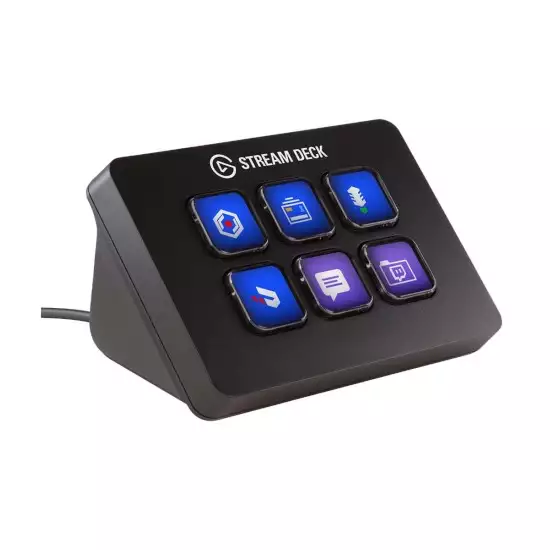
The Elgato Stream Deck Mini is a compact desktop controller featuring six customizable LCD keys that provide one-touch access to streaming commands, application shortcuts and productivity workflows.
Each key can display a custom icon and trigger individual actions or multi-step commands. It is suitable for controlling OBS Studio, Twitch, YouTube, audio applications, smart-home integrations, video calls and other compatible software without repeatedly navigating menus or memorizing keyboard shortcuts.
Its small footprint makes it ideal for compact gaming desks, portable streaming setups and users who need essential Stream Deck functionality without a larger control surface.
Key Features
- Six customizable LCD keys
- One-touch application and streaming controls
- Custom icons and key labels
- Multi Action command sequences
- Profiles and nested folders
- Drag-and-drop Stream Deck software
- Switches profiles automatically by application
- Supports downloadable plugins and icon packs
- Compatible with OBS Studio
- Twitch and YouTube workflow integration
- Supports audio, lighting and productivity controls
- USB-powered operation
- Compact desktop design
- Integrated angled stand
- Compatible with Windows and macOS
- Color: Black
- Condition: Open Sealed
Six Customizable LCD Keys
Unlike a standard macro keypad, each Stream Deck Mini key contains an LCD display. Icons, labels and actions can be customized according to the user’s workflow.
The keys can be configured to:
- Start or stop a livestream
- Start or stop recording
- Switch OBS scenes
- Mute or unmute a microphone
- Control system or application audio
- Display or hide sources
- Send chat messages
- Launch applications
- Open websites or folders
- Execute keyboard shortcuts
- Control compatible lighting
- Start multi-step workflows
Multi Action Commands
A single key can trigger several actions in a programmed sequence. For example, one press can launch streaming software, change an OBS scene, mute selected audio channels and activate compatible studio lighting.
Delays can be inserted between supported actions to create organized automated workflows.
Profiles and Folders
The six physical keys do not limit the controller to six total commands. Keys can be organized into folders and pages, allowing users to access additional actions.
Custom profiles can be created for different applications, such as:
- Streaming profile
- Video-editing profile
- Audio-control profile
- Gaming profile
- Productivity profile
- Video-conferencing profile
Application-specific profiles can appear automatically when the associated program is brought into focus.
Streaming Controls
The Stream Deck Mini is particularly useful for controlling livestreaming functions without interrupting gameplay or content presentation.
Compatible workflows can include:
- Changing OBS scenes
- Starting and stopping broadcasts
- Starting and stopping recordings
- Muting microphones
- Enabling or disabling sources
- Saving replay buffers
- Displaying overlays
- Posting prepared chat messages
- Triggering sound effects
- Running advertisements through supported services
Available actions depend on the installed software, account permissions and plugin support.
Productivity and Creative Work
The device is not limited to livestreaming. Its keys can be assigned to everyday computer shortcuts and creative applications.
Example uses include:
- Launching frequently used programs
- Opening project folders
- Controlling media playback
- Running keyboard shortcuts
- Pasting prepared text
- Managing video calls
- Activating editing commands
- Controlling compatible presentation software
- Running scripts or supported automation actions
- Switching audio devices through compatible plugins
Stream Deck Software
Customization is handled through Elgato’s Stream Deck desktop software. Actions are dragged from the software’s action list and dropped onto virtual keys representing the six physical LCD buttons.
Users can customize:
- Key icons
- Labels
- Functions
- Profiles
- Folders
- Pages
- Multi Action sequences
- Application-specific behavior
Additional plugins, icon packs and profiles may be available through the Stream Deck Marketplace. Some integrations require separate applications, accounts, subscriptions or compatible hardware.
Compact Desktop Design
The Stream Deck Mini is substantially smaller than larger Stream Deck models, making it suitable for desks with limited space.
Its fixed angled design positions the keys for convenient viewing and operation. Power and data are supplied through the attached USB cable, so a separate power adapter is not required.
Specifications
| Specification | Details |
|---|---|
| Brand | Elgato |
| Product | Stream Deck Mini |
| Product Type | Customizable desktop controller |
| Number of Keys | 6 |
| Key Type | Customizable LCD buttons |
| Custom Icons | Yes |
| Custom Labels | Yes |
| Multi Action Support | Yes |
| Profiles and Folders | Yes |
| Application-Specific Profiles | Yes |
| Plugin Support | Yes |
| Computer Connection | USB |
| Power Source | USB-powered |
| USB Cable | Integrated |
| Display | Individual LCD display beneath each key |
| Approximate Dimensions | 84 × 60 × 58mm |
| Approximate Weight | 160g |
| Color | Black |
| Windows Compatibility | Yes |
| macOS Compatibility | Yes |
| Stand | Integrated fixed-angle design |
| Condition | Open Sealed |
Software Compatibility
The Stream Deck Mini can be used with supported integrations and keyboard-shortcut workflows involving applications and services such as:
- OBS Studio
- Streamlabs Desktop
- Twitch
- YouTube
- Discord
- Spotify
- Zoom
- Microsoft Teams
- Philips Hue
- Elgato Key Light
- Elgato Wave Link
- Video-editing applications
- Audio-production software
- Presentation applications
- General Windows and macOS shortcuts
Compatibility can change with application updates. Some integrations require plugins, separate software or signed-in service accounts.
System Requirements
A compatible setup generally requires:
- Windows or macOS computer
- Available USB port
- Supported version of Stream Deck software
- Internet connection for downloading the software, updates and plugins
- Compatible third-party applications for integration-specific controls
This model is designed for desktop and laptop computers. It does not operate as a standalone controller and cannot connect directly to a game console to control console functions.
Package Contents
The original retail package should include:
- Elgato Stream Deck Mini
- Integrated USB cable
- Quick-start documentation, if supplied
- Original internal packaging
No separate USB cable, stand or wall power adapter is normally required.
Setup and Operation
- Connect the integrated USB cable to a compatible computer.
- Download and install Elgato Stream Deck software.
- Allow the software to detect the device.
- Drag desired actions onto the six virtual keys.
- Assign icons, labels and shortcuts.
- Install any required plugins.
- Create folders or profiles for additional commands.
- Press each physical key to confirm its assigned action.
Open Sealed Inspection Checklist
Because this unit is sold as Open Sealed, verify the following:
- Confirm that it is the six-key Stream Deck Mini.
- Check the enclosure for cracks or heavy scratches.
- Inspect all six LCD keys for damage.
- Check for dead pixels, discoloration or severe brightness differences.
- Press every key and confirm normal tactile operation.
- Inspect the integrated USB cable for cuts, bends or exposed wiring.
- Check the USB connector for damage or corrosion.
- Connect the unit to a compatible Windows or macOS computer.
- Confirm that Stream Deck software detects the device.
- Test icon display on every key.
- Assign and test an action on each button.
- Test folders and profile switching.
- Check for intermittent USB disconnection.
- Confirm the base sits securely without excessive movement.
- Verify the original box and documentation are present.
- Check available seller warranty separately.
Important Notes
- This model has six physical LCD keys.
- Additional commands can be accessed using folders, pages and profiles.
- It requires a Windows or macOS computer.
- It does not function as a standalone device.
- It cannot be connected directly to a PS5 or Xbox as a console controller.
- The USB cable is integrated and normally cannot be detached.
- It does not include knobs, dials or touch strips.
- It does not have the interchangeable faceplate found on some newer models.
- Available actions depend on installed applications and plugins.
- Some online-service functions require an active account.
- Some third-party plugins may require separate subscriptions or purchases.
- Stream Deck software and integrations can change over time.
- Open Sealed condition and warranty coverage depend on the seller.
Best For
- New livestreamers
- Compact gaming desks
- OBS Studio control
- Twitch and YouTube streaming
- Podcast controls
- Video conferencing
- Content-creation shortcuts
- Audio and microphone control
- Application launching
- Repetitive workflow automation
- Users who need essential Stream Deck controls in a small size
Why Choose the Elgato Stream Deck Mini?
- Provides six customizable LCD keys.
- Offers one-touch access to frequently used actions.
- Supports multi-step automated commands.
- Extends beyond six actions through folders and profiles.
- Works with popular streaming and productivity software.
- Automatically changes profiles for selected applications.
- Supports downloadable plugins and custom icons.
- Requires minimal desk space.
- Uses a simple USB connection without an external power adapter.
- Suitable for streaming, productivity and creative workflows.






![Govee RGBIC LED Strip 5m, Segmented Rainbow-Like Colour Picking LED Lights, Bluetooth APP Control Music Sync LED Lights for Bedroom, Party, Kitchen, TV [Energy Class A]](image/cache/wp/gp/Product/1747-250x250.webp "Govee RGBIC LED Strip 5m, Segmented Rainbow-Like Colour Picking LED Lights, Bluetooth APP Control Music Sync LED Lights for Bedroom, Party, Kitchen, TV [Energy Class A]")