




































































Installments
Minimum amount for installment is 500 L.E


| Months | Monthly installment | Overall Cost | |
| 12 | 77 EGP | 927 EGP | |
| 18 | 53 EGP | 959 EGP |
| Months | Monthly installment | Overall Cost | |
| 12 | 78 EGP | 936 EGP | |
| 18 | 55 EGP | 986 EGP | |
| 24 | 43 EGP | 1,033 EGP | |
| 36 | 31 EGP | 1,123 EGP |
| Months | Monthly installment | Overall Cost | |
| 6 | 137 EGP | 824 EGP | |
| 12 | 79 EGP | 943 EGP |
| Months | Monthly installment | Overall Cost | |
| 12 | 81 EGP | 976 EGP | |
| 18 | 58 EGP | 1,035 EGP | |
| 24 | 46 EGP | 1,104 EGP |
| Months | Monthly installment | Overall Cost | |
| 6 | 137 EGP | 824 EGP | |
| 12 | 70 EGP | 840 EGP | |
| 18 | 47 EGP | 840 EGP | |
| 24 | 35 EGP | 840 EGP | |
| 36 | 23 EGP | 840 EGP |
| Months | Monthly installment | Overall Cost | |
| 12 | 80 EGP | 959 EGP |
| Months | Monthly installment | Overall Cost | |
| 12 | 78 EGP | 931 EGP | |
| 18 | 54 EGP | 964 EGP | |
| 24 | 42 EGP | 1,009 EGP |
| Months | Monthly installment | Overall Cost | |
| 6 | 137 EGP | 824 EGP | |
| 9 | 102 EGP | 918 EGP | |
| 10 | 93 EGP | 926 EGP | |
| 12 | 79 EGP | 951 EGP | |
| 18 | 55 EGP | 990 EGP | |
| 36 | 31 EGP | 1,108 EGP |
| Months | Monthly installment | Overall Cost | |
| 12 | 80 EGP | 959 EGP | |
| 18 | 57 EGP | 1,017 EGP | |
| 24 | 45 EGP | 1,079 EGP |
| Months | Monthly installment | Overall Cost | |
| 6 | 137 EGP | 824 EGP | |
| 12 | 77 EGP | 926 EGP |
| Months | Monthly installment | Overall Cost | |
| 12 | 75 EGP | 906 EGP | |
| 24 | 39 EGP | 939 EGP |
- Stock: Out Of Stock
Note : For cib installment from 12 to 36 month interest calculated by bank
'Check in-store availability
×This game is available in 1 stores and can also be delivered to your home with cash-on-delivery option.
Store Madinty
Shop G ground Floor All Season Park Mall Madinty- Egypt
Ready for Pick Up On: Today
Store Working Hours:
Saturday to Wednesday: 10:00 AM – 10:00 PM
Thursday & Friday: 10:00 AM – 12:00 Midnight
متاح في هذا الفرع
Warehouse Fifth Settlement
21 Hay 4 District 3 Fifth Settlement New Cairo - Egypt
Ready for Pick Up On: Today
Store Working Hours: Saturday to Thursday 9:00AM - 5:00PM
غير متاح حالياً
Store Arabella
Shop LL-10 beside Mahmoud El Far Market -Arabella Mall Fifth Settlement New Cairo - Egypt
Ready for Pick Up On: Today
Store Working Hours:
Saturday to Wednesday: 10:00 AM – 11:00 PM
Thursday & Friday: 10:00 AM – 12:00 Midnight
غير متاح حالياً
Store Mall Of Arab
Shop G285 Near Gate 23 - Mall of Arabia 6 October City - Egypt
Ready for Pick Up On: Today
Store Working Hours:
Saturday to Wednesday: 10:00 AM – 11:00 PM
Thursday & Friday: 10:00 AM – 12:00 Midnight
غير متاح حالياً
More from this brand


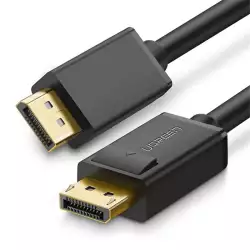
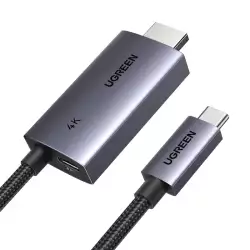
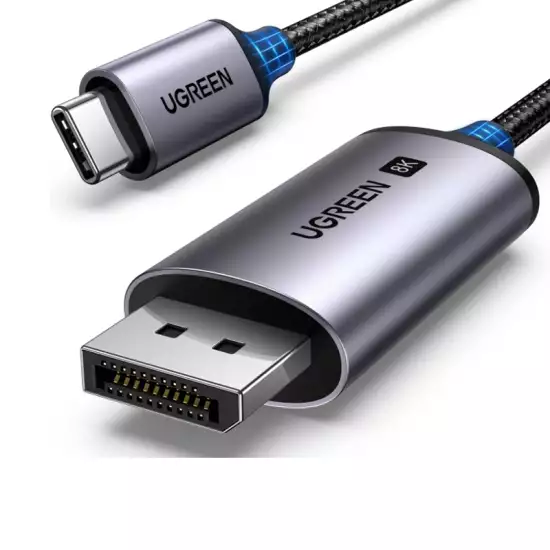
UGREEN CM556 25158 USB-C to DisplayPort 1.4 Cable 2M – 8K@60Hz, 4K@240Hz, 32.4Gbps, HDR, DSC, VRR & HDCP 2.3
Description
The UGREEN CM556 25158 is a 2-meter USB-C-to-DisplayPort cable designed to connect a USB-C, Thunderbolt 3, or Thunderbolt 4 source directly to a monitor or projector with a full-size DisplayPort input.
Its DisplayPort 1.4 HBR3 connection provides a raw link rate up to 32.4Gbps and supports resolutions up to 8K at 60Hz, 4K at 240Hz, and 1440p at 240Hz with compatible source hardware and displays.
Support for HDR, Display Stream Compression, HDCP 2.3, VRR, AMD FreeSync, NVIDIA G-SYNC, MST, and digital audio makes it suitable for gaming, professional creative work, and extended desktop setups.
Key Features
- USB Type-C Male to DisplayPort Male
- DisplayPort 1.4 / HBR3
- Up to 32.4Gbps raw link rate
- Supports 8K at 60Hz
- Supports 4K at 240Hz
- Supports 4K at 144Hz and 120Hz
- Supports 1440p at 240Hz
- Supports 1080p high-refresh modes
- HDR support
- Display Stream Compression
- Forward Error Correction
- HDCP 2.3 support
- VRR – Variable Refresh Rate
- AMD FreeSync support
- NVIDIA G-SYNC support
- MST transport support
- Mirror and extended display modes
- MacBook clamshell-mode compatibility
- Samsung DeX support
- Digital audio and video transmission
- Thunderbolt 3 and Thunderbolt 4 compatible
- Plug-and-play operation
- Aluminum-alloy connector housings
- Tinned-copper conductors
- Triple-layer signal shielding
- Nylon-braided cable jacket
- Length: 2M / approximately 6.6ft
- Color: Gray/black
- Model: CM556
- SKU: 25158
- EAN: 6941876221585
8K@60Hz and 4K@240Hz
The UGREEN 25158 supports demanding high-resolution and high-refresh-rate DisplayPort modes.
| Resolution | Maximum Listed Refresh Rate* |
|---|---|
| 8K / 7680 × 4320 | 60Hz |
| 8K / 7680 × 4320 | 30Hz |
| 4K / 3840 × 2160 | 240Hz |
| 4K / 3840 × 2160 | 144Hz |
| 4K / 3840 × 2160 | 120Hz |
| 4K UHD | 60Hz |
| 2560 × 1440 / QHD | 240Hz |
| 1920 × 1080 / Full HD | 240Hz |
*Available modes depend on the source GPU, USB-C video-output capability, operating system, graphics driver, DisplayPort monitor, color configuration, and DSC support.
DisplayPort 1.4 HBR3 Bandwidth
The cable provides a DisplayPort 1.4 HBR3 raw link rate up to 32.4Gbps.
This makes it suitable for:
- 8K monitors
- 4K high-refresh gaming monitors
- 1440p esports displays
- Professional video-editing monitors
- High-resolution photo editing
- CAD and engineering workstations
- Large extended desktops
- MacBook-to-DisplayPort monitor connections
The 32.4Gbps specification refers to the DisplayPort video link. It is not a general USB file-transfer speed.
USB-C Video Requirement
The USB-C port on the source device must support one of the following:
- DisplayPort Alternate Mode
- Thunderbolt 3
- Thunderbolt 4
- Compatible USB4 video output
A charging-only or data-only USB-C port cannot provide a display signal through this cable.
Check the source device specifications for DisplayPort Alt Mode, Thunderbolt, or external-display support before purchase.
Unidirectional Connection
The cable operates in one direction:
- USB-C connector: Connects to the source computer, tablet, or smartphone.
- DisplayPort connector: Connects to the monitor or projector.
Reverse operation is not supported. It cannot connect a DisplayPort-output computer to a USB-C monitor.
Display Stream Compression
DSC helps compatible hardware carry high-resolution and high-refresh-rate signals within the available DisplayPort 1.4 bandwidth.
DSC may be required for:
- 8K@60Hz
- 4K@240Hz
- Some 4K@144Hz HDR configurations
- Higher color depths
- High-resolution RGB or 4:4:4 output
Both the source GPU and display must support DSC for modes that require it.
HDR Support
The UGREEN 25158 supports transmission of compatible HDR video signals, providing enhanced:
- Contrast
- Brightness
- Color depth
- Highlight detail
- Shadow detail
- Overall image realism
HDR requires compatible content, graphics hardware, operating-system settings, drivers, and an HDR-capable monitor.
VRR, FreeSync and G-SYNC
The cable supports compatible adaptive-refresh signals, including:
- Variable Refresh Rate
- AMD FreeSync
- NVIDIA G-SYNC
These technologies allow a compatible monitor to synchronize its refresh rate with the GPU’s output, helping reduce screen tearing and stuttering.
Availability depends on the source graphics hardware, monitor, operating system, and driver configuration.
Mirror and Extended Display Modes
The cable supports common external-display configurations.
Mirror mode
Displays the same image on the source device and external monitor.
Extended mode
Uses the DisplayPort monitor as additional desktop space.
MacBook clamshell mode
Compatible MacBook models can operate with the lid closed when their external power, keyboard, mouse, and display requirements are met.
Samsung DeX
Supported Samsung Galaxy devices can display a desktop-style DeX interface on the connected monitor.
MST and Multiple Displays
Compatible Windows systems can use DisplayPort MST through an appropriate MST hub or daisy-chain monitor configuration.
MST operation requires:
- A compatible GPU and USB-C video output
- MST-capable monitors or an MST hub
- Sufficient link bandwidth
- Operating-system and driver support
The cable itself has one DisplayPort connector and does not split the signal without additional compatible equipment.
macOS generally does not support independent extended displays through standard DisplayPort MST. External-display limits also vary between Mac models.
Digital Audio Support
DisplayPort can carry compatible digital audio and video simultaneously.
Supported audio can include:
- Stereo audio
- Multichannel digital audio
- Dolby Atmos passthrough
- DTS audio passthrough
The source, media, monitor, and operating-system audio settings determine the available audio format.
Durable Braided Construction
The UGREEN 25158 features:
- Tinned-copper conductors
- Triple-layer signal shielding
- Tinplate protective material
- Aluminum-alloy connector housings
- Reinforced connector joints
- Nylon-braided outer jacket
The 2-meter length provides additional flexibility for larger desks, monitor arms, standing desks, and installations where the source is positioned farther from the display.
Specifications
| Specification | Details |
|---|---|
| Brand | UGREEN |
| Model | CM556 |
| SKU | 25158 |
| Product Type | USB-C-to-DisplayPort cable |
| Source Connector | USB Type-C Male |
| Display Connector | Full-size DisplayPort Male |
| Direction | USB-C source to DisplayPort display |
| DisplayPort Standard | DisplayPort 1.4 / HBR3 |
| Maximum Raw Link Rate | 32.4Gbps |
| Maximum Resolution | 8K / 7680 × 4320 at 60Hz |
| 4K at 240Hz | Supported |
| 4K at 144Hz | Supported |
| 4K at 120Hz | Supported |
| 1440p at 240Hz | Supported |
| 1080p at 240Hz | Supported |
| HDR | Supported |
| DSC | Supported |
| FEC | Supported |
| HDCP | HDCP 2.3, backward compatible |
| VRR | Supported |
| AMD FreeSync | Supported |
| NVIDIA G-SYNC | Supported |
| MST | Supported with compatible equipment |
| Digital Audio | Supported |
| Mirror Mode | Supported |
| Extended Mode | Supported |
| Samsung DeX | Supported on compatible devices |
| Thunderbolt 3/4 | Compatible |
| USB Data Transfer | No |
| Device Charging | No |
| External Power | Not required |
| Driver Installation | Not normally required |
| Connector Housing | Aluminum alloy |
| Conductor | Tinned copper |
| Shielding | Triple-layer shielding |
| Cable Jacket | Nylon braided |
| Cable Length | 2M / approximately 6.6ft |
| Color | Gray/black |
| EAN | 6941876221585 |
Mac Compatibility
Compatible USB-C or Thunderbolt-equipped models can include:
- MacBook Pro
- MacBook Air
- Mac mini
- Mac Studio
- iMac
The cable’s maximum rating does not mean every Mac can output 8K@60Hz or 4K@240Hz. Available resolution, refresh rate, and number of external monitors depend on the processor and exact Mac model.
iPad and Mobile Compatibility
Compatible devices can include:
- iPad Pro
- iPad Air
- iPad mini
- USB-C iPhone models
- Samsung Galaxy phones with wired video output
- Samsung Galaxy tablets
- Other Android devices with DisplayPort Alt Mode
Some devices support only screen mirroring, while compatible iPads may provide extended displays through Stage Manager. Samsung DeX availability depends on the exact Galaxy model.
Windows Compatibility
Suitable devices can include:
- Dell XPS 15
- Dell Latitude
- HP Spectre
- HP EliteBook
- Lenovo ThinkPad
- Microsoft Surface
- ASUS laptops
- Acer laptops
- Gaming laptops
- USB-C-equipped desktop computers
- Compatible handheld gaming PCs
The selected USB-C port must support DisplayPort Alt Mode or Thunderbolt video output.
What This Cable Does Not Do
- It does not work from DisplayPort source to USB-C display.
- It does not add video output to a charge-only USB-C port.
- It does not provide laptop charging.
- It does not transfer ordinary USB files or connect peripherals.
- It does not connect directly to an HDMI-only display.
- It does not split one signal between multiple displays by itself.
- It does not guarantee 8K@60Hz or 4K@240Hz on every USB-C device.
- It cannot exceed the external-display capabilities of the source device.
Installation
- Connect the USB-C plug to the source device.
- Connect the DisplayPort plug to the monitor.
- Select the DisplayPort input on the monitor.
- Open the source device’s display settings.
- Select mirror or extended mode.
- Choose a supported resolution and refresh rate.
- Enable HDR, DSC, or adaptive sync where required.
For maximum performance, connect the cable directly. Docks, KVM switches, extension cables, couplers, and additional adapters can reduce the available bandwidth or cause display-handshake problems.
Important Notes
To achieve 8K@60Hz or 4K@240Hz, the complete connection must support the selected mode:
Compatible USB-C/Thunderbolt source → UGREEN 25158 → compatible DisplayPort 1.4 monitor
If the required mode is unavailable:
- Verify DisplayPort Alt Mode or Thunderbolt support.
- Update the graphics driver and operating system.
- Connect directly without a dock.
- Enable DisplayPort 1.4 or DSC in the monitor menu.
- Confirm that the monitor supports the requested refresh rate through DisplayPort.
- Test a lower resolution or refresh rate.
- Check the source device’s documented external-display limits.
Best For
- MacBook-to-DisplayPort monitor connections
- Dell XPS and other USB-C laptops
- 8K monitors
- 4K high-refresh gaming monitors
- 1440p esports displays
- Extended desktop setups
- Mac mini and Mac Studio
- iPad external displays
- Samsung DeX
- Creative and engineering workstations
- Standing desks and monitor-arm installations
Why Choose the UGREEN 25158?
- Supports up to 8K@60Hz
- Supports 4K at up to 240Hz
- Provides a 32.4Gbps DisplayPort 1.4 HBR3 link
- Supports HDR, DSC, and HDCP 2.3
- Supports compatible VRR, FreeSync, and G-SYNC
- Works with Thunderbolt 3 and Thunderbolt 4 devices
- Supports mirror and extended desktop modes
- Requires no software or external power
- Durable aluminum and nylon-braided construction
- Extended 2-meter cable length


About this item
- 8K Displayport Cable: This USB C to Displayport cable support up to 8K@60Hz/30Hz, 4K@240Hz/144Hz/120Hz/60Hz/30Hz, 2K@240Hz/144Hz/120Hz/60Hz, 1080P@240Hz/120Hz/60Hz resolution. With HDR, HDCP2.3, and eARC functions, you can stream video to your monitor, enjoy more realistic photos and videos with more vivid colors and higher contrast.
- Take Your Game to the Next Level: This USB C to DisplayPort 1.4 cable support up to 32.4Gbps bandwidth, which is 50% higher than DP 1.2 cable. This makes it not only helps you transmit higher-definition video signals but also supports FreeSync and G-Sync, which are necessary for games. VRR and ALLM bring you a smoother gaming experience, especially in FPS, 3A masterpieces, and MOBA games.
- Multiple Modes: The USB C to DisplayPort cable supports MST Daisy Chain Mode, Samsung Dex Mode, Macbook Clamshell Mode, Mirror Mode, and Extend Mode. MST Daisy Chain Mode minimizes cable clutter and extends the display range of the host device. Meet all your needs from everyday office use to professional video and photo editing.