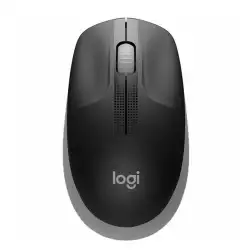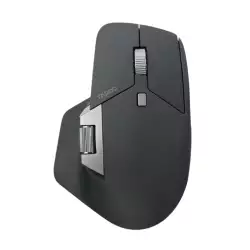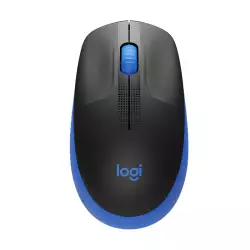






































































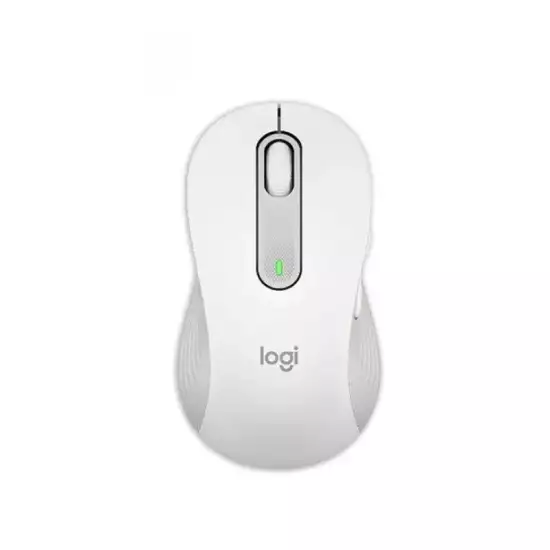

- Connection type: Bluetooth (Bluetooth Low Energy) / USB (via the included Logi Bolt USB Receiver).
- Sensor Type: Optical (Logitech Advanced Optical Tracking).
- DPI: 2400–3200 (The hardware sensor supports a customizable range from 400 to 4,000 DPI using software).
- Number of Buttons: 4–6 (It has exactly 5 buttons: Left/Right-click, Back/Forward side buttons, and a scroll wheel with a middle click).
- RGB Lighting: No.
- Compatibility: Windows / macOS / Linux (It also extends support to iPadOS, Android, and ChromeOS).
- Color: Off-White.
Installments
Minimum amount for installment is 500 L.E


| Months | Monthly installment | Overall Cost | |
| 12 | 178 EGP | 2,136 EGP | |
| 18 | 123 EGP | 2,212 EGP |
| Months | Monthly installment | Overall Cost | |
| 12 | 180 EGP | 2,157 EGP | |
| 18 | 126 EGP | 2,273 EGP | |
| 24 | 99 EGP | 2,381 EGP | |
| 36 | 72 EGP | 2,590 EGP |
| Months | Monthly installment | Overall Cost | |
| 6 | 317 EGP | 1,899 EGP | |
| 12 | 181 EGP | 2,174 EGP |
| Months | Monthly installment | Overall Cost | |
| 12 | 188 EGP | 2,250 EGP | |
| 18 | 133 EGP | 2,387 EGP | |
| 24 | 106 EGP | 2,545 EGP |
| Months | Monthly installment | Overall Cost | |
| 6 | 317 EGP | 1,899 EGP | |
| 12 | 161 EGP | 1,937 EGP | |
| 18 | 108 EGP | 1,937 EGP | |
| 24 | 81 EGP | 1,937 EGP | |
| 36 | 54 EGP | 1,937 EGP |
| Months | Monthly installment | Overall Cost | |
| 12 | 184 EGP | 2,212 EGP |
| Months | Monthly installment | Overall Cost | |
| 12 | 179 EGP | 2,146 EGP | |
| 18 | 123 EGP | 2,222 EGP | |
| 24 | 97 EGP | 2,326 EGP |
| Months | Monthly installment | Overall Cost | |
| 6 | 317 EGP | 1,899 EGP | |
| 9 | 235 EGP | 2,116 EGP | |
| 10 | 214 EGP | 2,136 EGP | |
| 12 | 183 EGP | 2,194 EGP | |
| 18 | 127 EGP | 2,284 EGP | |
| 36 | 71 EGP | 2,555 EGP |
| Months | Monthly installment | Overall Cost | |
| 12 | 184 EGP | 2,212 EGP | |
| 18 | 130 EGP | 2,345 EGP | |
| 24 | 104 EGP | 2,488 EGP |
| Months | Monthly installment | Overall Cost | |
| 6 | 317 EGP | 1,899 EGP | |
| 12 | 178 EGP | 2,136 EGP |
| Months | Monthly installment | Overall Cost | |
| 12 | 174 EGP | 2,089 EGP | |
| 24 | 90 EGP | 2,165 EGP |
- Stock: In Stock
Note : For cib installment from 12 to 36 month interest calculated by bank
'Check in-store availability
×This game is available in 2 stores and can also be delivered to your home with cash-on-delivery option.
Store Madinty
Shop G ground Floor All Season Park Mall Madinty- Egypt
Ready for Pick Up On: Today
Store Working Hours:
Saturday to Wednesday: 10:00 AM – 10:00 PM
Thursday & Friday: 10:00 AM – 12:00 Midnight
متاح في هذا الفرع
Warehouse Fifth Settlement
21 Hay 4 District 3 Fifth Settlement New Cairo - Egypt
Ready for Pick Up On: Today
Store Working Hours: Saturday to Thursday 9:00AM - 5:00PM
متاح في هذا الفرع
Store Arabella
Shop LL-10 beside Mahmoud El Far Market -Arabella Mall Fifth Settlement New Cairo - Egypt
Ready for Pick Up On: Today
Store Working Hours:
Saturday to Wednesday: 10:00 AM – 11:00 PM
Thursday & Friday: 10:00 AM – 12:00 Midnight
غير متاح حالياً
Store Mall Of Arab
Shop G285 Near Gate 23 - Mall of Arabia 6 October City - Egypt
Ready for Pick Up On: Today
Store Working Hours:
Saturday to Wednesday: 10:00 AM – 11:00 PM
Thursday & Friday: 10:00 AM – 12:00 Midnight
غير متاح حالياً
More from this brand


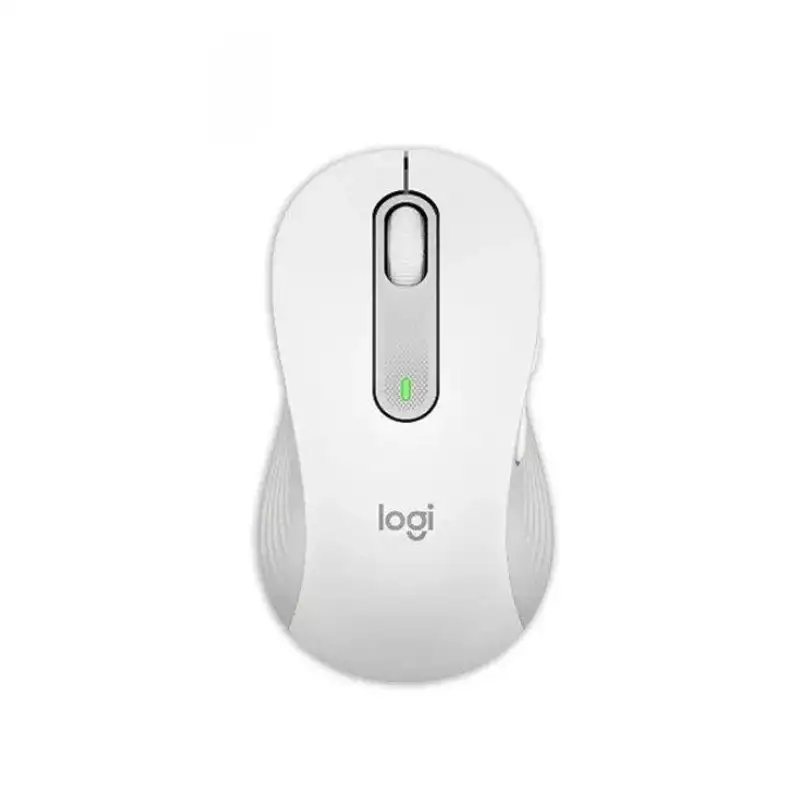
Logitech Signature M650 Wireless Bluetooth Mouse with SmartWheel & SilentTouch - Off-White | 910-006255
Upgrade your everyday productivity with the Logitech Signature M650 Wireless Mouse, a comfortable and quiet wireless mouse designed for work, study, browsing, office applications, and everyday laptop use.
This exact Logitech Signature M650 | 910-006255 is the Off-White EMEA version, with EAN 5099206097247. It combines Bluetooth Low Energy and Logi Bolt wireless connectivity, Logitech SmartWheel scrolling, SilentTouch quiet-click technology, customizable side buttons, and Logitech Advanced Optical Tracking with sensitivity adjustable up to 4,000 DPI through supported software.
Key Features
- Off-White Color – Exact EMEA version for part number 910-006255.
- Standard Signature M650 Size – Designed for users who prefer Logitech's regular compact M650 shape rather than the larger M650 L.
- SmartWheel Scrolling – Provides precise line-by-line scrolling or rapid scrolling through long pages with a quick flick.
- SilentTouch Technology – Reduces distracting clicking noise by more than 90% compared with Logitech M185 under Logitech's specified test conditions.
- Bluetooth Low Energy – Connect directly to compatible laptops, desktops, tablets, and other devices without occupying a USB port.
- Logi Bolt USB Receiver Included – Provides an alternative dedicated wireless connection.
- Up to 10m Wireless Range – Suitable for normal desk, office, classroom, and meeting-room use.
- Logitech Advanced Optical Tracking
- 400–4,000 DPI Software-Adjustable Resolution – Suitable for standard, QHD, ultrawide, and 4K desktop environments.
- 5 Main Buttons – Left click, right click, Back, Forward, and scroll-wheel middle click.
- Customizable Side Buttons – Supported through Logi Options+ on compatible Windows and macOS systems.
- Comfortable Contoured Design – Includes rubberized side areas and a supportive thumb area.
- Up to 24 Months Battery Life with Logi Bolt.
- Up to 20 Months Battery Life via Bluetooth.
- 1 × AA Replaceable Battery Included.
- Windows Compatible
- macOS Compatible
- ChromeOS Compatible
- Linux Compatible
- iPadOS Compatible
- Android Compatible
- Works with Surface.
- Logi Options+ Support on compatible Windows and macOS systems.
Specifications
| Feature | Details |
|---|---|
| Brand | Logitech |
| Series | Signature |
| Model | M650 |
| Part Number | 910-006255 |
| EAN | 5099206097247 |
| Region | EMEA |
| Color | Off-White |
| Product Type | Wireless Optical Mouse |
| Orientation | Right-Handed / Contoured |
| Sensor | Logitech Advanced Optical Tracking |
| DPI Range | 400–4,000 DPI via Software |
| Main Buttons | 5 |
| Side Buttons | Back / Forward |
| Scroll Wheel | Logitech SmartWheel |
| Quiet Click Technology | SilentTouch |
| Wireless Connection | Bluetooth Low Energy + Logi Bolt |
| Wireless Range | Up to 10m |
| Receiver | Logi Bolt USB Receiver Included |
| Battery | 1 × AA |
| Rechargeable | No |
| Battery Life – Logi Bolt | Up to 24 Months |
| Battery Life – Bluetooth | Up to 20 Months |
| Software | Logi Options+ |
| Windows | Yes |
| macOS | Yes |
| Linux | Yes |
| ChromeOS | Yes |
| iPadOS | Yes |
| Android | Yes |
| Works with Surface | Yes |
| Dimensions | 108.2 × 61 × 38.8mm |
| Weight | 101.4g |
Logitech's current support specification confirms the 108.2 × 61 × 38.8mm dimensions, 101.4g weight, 400–4,000 DPI range, Bluetooth Low Energy, Logi Bolt, five main buttons, one-AA-battery design, and 10m wireless range.
Logitech SmartWheel Scrolling
The Signature M650 features Logitech SmartWheel, designed to combine precision and speed without requiring a separate scroll-mode button.
For detailed work, the wheel provides precise line-by-line scrolling. When you flick the wheel faster, it allows rapid movement through long webpages, documents, spreadsheets, or product catalogs.
This makes the M650 especially convenient for:
- Web Browsing
- Microsoft Excel
- PDF Documents
- Long Emails
- Ecommerce Backends
- Product Catalogues
- Microsoft Word
- Social Media
- Business Applications
SilentTouch Quiet Clicking
The M650 uses Logitech's SilentTouch technology to significantly reduce the noise generated by mouse clicks.
Logitech states that SilentTouch provides more than 90% less click noise compared with the Logitech M185, based on independent testing performed under specified conditions.
This makes the mouse especially suitable for:
- Offices
- Shared Workspaces
- Libraries
- Home Offices
- Study Rooms
- Meetings
- Late-Night Work
Logitech Advanced Optical Tracking
The M650 uses Logitech Advanced Optical Tracking and supports software-adjustable sensitivity from:
400 DPI up to 4,000 DPI.
This makes it flexible enough for different screen configurations.
Lower DPI settings can provide slower, more controlled cursor movement, while higher settings are useful for quickly moving across:
- QHD Monitors
- 4K Monitors
- Ultrawide Displays
- Dual-Monitor Setups
Five Main Buttons
The Logitech M650 provides five primary controls:
- Left Click
- Right Click
- Back
- Forward
- Scroll-Wheel Middle Click
Logitech also includes a separate connectivity control for wireless setup.
The Back and Forward buttons make browser and productivity navigation faster than with a basic three-button mouse.
Customizable Side Buttons
On supported Windows and macOS computers, users can customize supported mouse functions through Logi Options+.
Logitech specifically highlights customization of the side buttons for actions such as:
- Back / Forward
- Copy / Paste
- Application Shortcuts
- Frequently Used Commands
depending on software configuration.
Bluetooth Low Energy
The M650 supports Bluetooth Low Energy, allowing compatible devices to connect without the supplied USB receiver.
This is particularly useful for:
- MacBook
- Modern Windows Laptops
- Ultrabooks
- USB-C-Only Laptops
- iPads
- Android Tablets
Bluetooth lets you keep valuable USB ports available for other accessories.
Logi Bolt USB Receiver Included
For computers where a dedicated wireless connection is preferred, the package also includes a Logi Bolt USB receiver.
Logitech confirms that the receiver is supplied with the standard M650 and is stored inside the mouse when packaged.
This gives users two convenient connection choices:
Bluetooth Low Energy – no receiver required.
Logi Bolt – dedicated USB wireless connection.
Up to 10m Wireless Range
Logitech specifies an operating distance of up to approximately:
10 meters.
Actual wireless performance can vary depending on:
- Wireless Interference
- Computer Construction
- Receiver Position
- Nearby Wireless Devices
- Physical Obstacles
For standard desktop and laptop use, this provides more than enough range for most environments.
Long Battery Life
The Signature M650 operates from one replaceable AA battery.
Logitech's current specification separates battery life according to the connection method:
Logi Bolt Receiver: up to 24 months
Bluetooth Low Energy: up to 20 months.
Actual battery life varies according to use, battery quality, and operating conditions.
No Charging Required
The Signature M650 is not rechargeable.
Instead of requiring a charging cable, it runs from a standard AA battery that can be replaced when depleted. Logitech confirms the battery is user-replaceable.
For users who prefer extremely long battery life without periodically charging their mouse, this can be an advantage.
Comfortable Contoured Shape
Logitech designed the M650 around everyday comfort, with a contoured body, rubber side areas, and a soft thumb region.
This makes the mouse well suited for users spending several hours a day working on:
- Office Applications
- Web Browsers
- Ecommerce Systems
- Accounting Software
- Emails
- Spreadsheets
- General Business Software
Standard M650 Size
This exact 910-006255 is the regular Signature M650, not the larger M650 L.
Logitech's current specifications distinguish the standard M650 at:
108.2 × 61 × 38.8mm / 101.4g
from the larger M650 L at:
118.7 × 66.2 × 42mm / 115.4g.
This makes the standard M650 more compact and generally better suited to users who prefer a smaller mouse body.
Windows Compatibility
The M650 supports compatible Windows systems using either:
- Bluetooth Low Energy
- Logi Bolt USB Receiver
Logitech currently lists Windows 10 and Windows 11 among supported platforms.
Logi Options+ can also be used on supported Windows versions for advanced customization.
macOS Compatibility
The M650 supports compatible macOS systems through both Bluetooth and Logi Bolt.
For USB-C-only MacBooks, Bluetooth is especially convenient because no USB-A adapter is required.
iPadOS Compatibility
Logitech officially lists compatible iPadOS systems among the M650's supported Bluetooth platforms.
This makes the mouse suitable for productivity setups combining an iPad with:
- External Keyboard
- Tablet Stand
- External Display
- Office Applications
Android Compatibility
The M650 also supports compatible Android devices via Bluetooth Low Energy.
This can be useful for Android tablets and desktop-style mobile productivity setups.
Linux & ChromeOS Compatibility
Logitech additionally lists:
- Linux
- ChromeOS
among supported operating systems for the Signature M650.
Logi Options+
Logi Options+ provides additional customization on supported Windows and macOS systems.
Users can configure functions such as:
- Side Button Actions
- Pointer Settings
- Productivity Shortcuts
- Supported Application Functions
- Battery Monitoring
Logitech specifically promotes Options+ as a way to customize side buttons and improve productivity workflows.
Durable Everyday Design
Logitech's technical specification lists durability targets including:
- Left / Right Silent Buttons: 5 Million Clicks
- Scroll-Wheel Middle Click: 1 Million Clicks
- Back / Forward Buttons: 500,000 Clicks