





































































Installments
Minimum amount for installment is 500 L.E


| Months | Monthly installment | Overall Cost | |
| 12 | 109 EGP | 1,305 EGP | |
| 18 | 75 EGP | 1,352 EGP |
| Months | Monthly installment | Overall Cost | |
| 12 | 110 EGP | 1,318 EGP | |
| 18 | 77 EGP | 1,389 EGP | |
| 24 | 61 EGP | 1,455 EGP | |
| 36 | 44 EGP | 1,583 EGP |
| Months | Monthly installment | Overall Cost | |
| 6 | 193 EGP | 1,160 EGP | |
| 12 | 111 EGP | 1,329 EGP |
| Months | Monthly installment | Overall Cost | |
| 12 | 115 EGP | 1,375 EGP | |
| 18 | 81 EGP | 1,459 EGP | |
| 24 | 65 EGP | 1,555 EGP |
| Months | Monthly installment | Overall Cost | |
| 6 | 193 EGP | 1,160 EGP | |
| 12 | 99 EGP | 1,184 EGP | |
| 18 | 66 EGP | 1,184 EGP | |
| 24 | 49 EGP | 1,184 EGP | |
| 36 | 33 EGP | 1,184 EGP |
| Months | Monthly installment | Overall Cost | |
| 12 | 113 EGP | 1,352 EGP |
| Months | Monthly installment | Overall Cost | |
| 12 | 109 EGP | 1,311 EGP | |
| 18 | 75 EGP | 1,358 EGP | |
| 24 | 59 EGP | 1,421 EGP |
| Months | Monthly installment | Overall Cost | |
| 6 | 193 EGP | 1,160 EGP | |
| 9 | 144 EGP | 1,293 EGP | |
| 10 | 131 EGP | 1,305 EGP | |
| 12 | 112 EGP | 1,340 EGP | |
| 18 | 78 EGP | 1,395 EGP | |
| 36 | 43 EGP | 1,562 EGP |
| Months | Monthly installment | Overall Cost | |
| 12 | 113 EGP | 1,352 EGP | |
| 18 | 80 EGP | 1,433 EGP | |
| 24 | 63 EGP | 1,520 EGP |
| Months | Monthly installment | Overall Cost | |
| 6 | 193 EGP | 1,160 EGP | |
| 12 | 109 EGP | 1,305 EGP |
| Months | Monthly installment | Overall Cost | |
| 12 | 106 EGP | 1,276 EGP | |
| 24 | 55 EGP | 1,323 EGP |
- Stock: Out Of Stock
Note : For cib installment from 12 to 36 month interest calculated by bank
'Check in-store availability
×This game is available in 0 stores and can also be delivered to your home with cash-on-delivery option.
Store Madinty
Shop G ground Floor All Season Park Mall Madinty- Egypt
Ready for Pick Up On: Today
Store Working Hours:
Saturday to Wednesday: 10:00 AM – 10:00 PM
Thursday & Friday: 10:00 AM – 12:00 Midnight
غير متاح حالياً
Warehouse Fifth Settlement
21 Hay 4 District 3 Fifth Settlement New Cairo - Egypt
Ready for Pick Up On: Today
Store Working Hours: Saturday to Thursday 9:00AM - 5:00PM
غير متاح حالياً
Store Arabella
Shop LL-10 beside Mahmoud El Far Market -Arabella Mall Fifth Settlement New Cairo - Egypt
Ready for Pick Up On: Today
Store Working Hours:
Saturday to Wednesday: 10:00 AM – 11:00 PM
Thursday & Friday: 10:00 AM – 12:00 Midnight
غير متاح حالياً
Store Mall Of Arab
Shop G285 Near Gate 23 - Mall of Arabia 6 October City - Egypt
Ready for Pick Up On: Today
Store Working Hours:
Saturday to Wednesday: 10:00 AM – 11:00 PM
Thursday & Friday: 10:00 AM – 12:00 Midnight
غير متاح حالياً
More from this brand


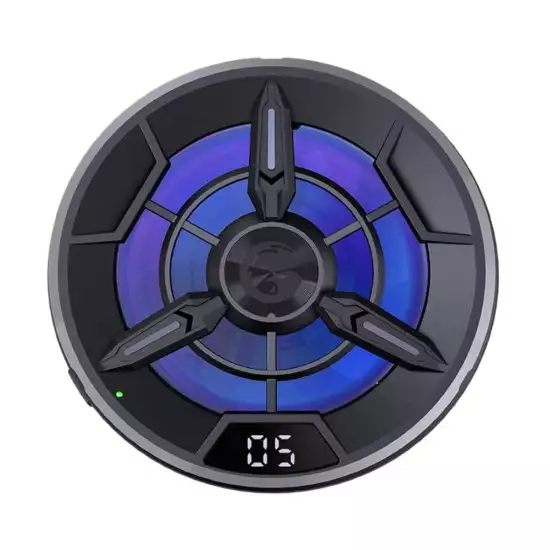
GameSir F9 Semiconductor Phone Cooler – 7-Blade Cooling Fan, Temperature Display & 7-Color Lighting (Open Sealed)
Description
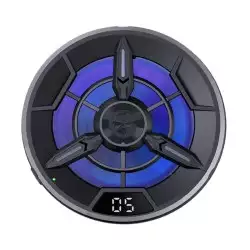
The GameSir F9 is an external semiconductor cooling radiator designed to help reduce heat buildup during mobile gaming, video recording, livestreaming and other demanding applications.
It combines an actively cooled semiconductor plate with a seven-blade fan. The cold plate draws heat from the back of the connected device, while the fan helps disperse that heat into the surrounding air. A built-in display shows the cooler’s measured contact-plate temperature, and seven-color cycling illumination adds a gaming-style appearance.
It is suitable for compatible iPhone and Android phones and may also be attached to suitable tablets, Nintendo Switch models and Steam Deck devices when their dimensions, cooling location and surface design permit secure installation.
Key Features
- Semiconductor thermoelectric cooling
- Seven-blade active cooling fan
- Real-time temperature display
- Seven-color cycling illumination
- Adjustable clip-on installation
- Direct-contact cooling plate
- Suitable for intensive mobile gaming
- Helps reduce heat-related performance throttling
- No Bluetooth or application required
- USB-powered operation
- Compatible with suitable iPhone and Android devices
- Can fit selected tablets and handheld consoles
- Compact portable design
- Condition: Open Sealed
Semiconductor Cooling Technology
The F9 uses a thermoelectric semiconductor element—commonly known as a Peltier cooler—to actively reduce the temperature of its contact plate.
Unlike a standard fan that only moves air across the phone, the semiconductor plate absorbs heat directly from the device’s rear surface. The attached heatsink and fan then release that heat into the surrounding air.
Cooling effectiveness depends on:
- Ambient room temperature
- USB power-source output
- Contact between the cold plate and device
- Phone or handheld material
- Position over the device’s internal heat source
- Game or application workload
- Device case thickness
- Local humidity
Seven-Blade Cooling Fan
The integrated seven-blade fan moves air through the heatsink to dissipate heat generated by the semiconductor module.
The fan is intended to provide a balance between:
- Cooling airflow
- Compact size
- Operating noise
- Power consumption
- Continuous gaming performance
Air intake and exhaust openings must remain unobstructed during use.
Real-Time Temperature Display
The built-in digital display shows the temperature detected around the cooler’s contact plate.
This reading should not be interpreted as the phone’s internal processor, battery or system temperature. It represents the cooler’s own sensor reading and can differ considerably from temperatures reported by the device’s software.
Seven-Color Cycling Lighting
Integrated lighting cycles through seven colors during operation, giving the cooler a gaming-oriented appearance.
Depending on the production version, the lighting may operate automatically rather than offering individual color selection or software control.
Helps Reduce Thermal Throttling
Phones and handheld gaming devices can reduce processor or graphics performance when their internal temperature becomes too high. This behavior is known as thermal throttling.
By drawing heat from the rear surface, the F9 may help:
- Maintain more stable frame rates
- Reduce exterior heat buildup
- Improve comfort during longer sessions
- Reduce heat during charging and gaming
- Maintain more consistent device performance
- Improve stability during livestreaming or recording
Actual performance improvements depend on the device and whether its main heat-generating components are located beneath the cooler.
Adjustable Clip-On Installation
The cooler uses an adjustable attachment mechanism that holds it against the rear surface of a compatible device.
For effective installation:
- Remove thick protective cases.
- Place the cooling plate against a flat section of the device.
- Avoid covering camera lenses.
- Avoid pressing physical buttons.
- Keep fan ventilation openings clear.
- Position the cooler near the device’s main heat source.
- Ensure the grip is secure but not excessively tight.
Devices with large camera modules, folding displays, curved backs or thick protective cases may not fit properly.
Device Compatibility
| Device Type | Compatibility |
|---|---|
| iPhone | Supported when physically compatible |
| Android Smartphones | Supported when physically compatible |
| Gaming Phones | Supported when physically compatible |
| Small Tablets | Depends on mounting position and thickness |
| Large Tablets | May require edge placement |
| Nintendo Switch | Depends on model and mounting position |
| Nintendo Switch OLED | Depends on physical fit |
| Nintendo Switch Lite | Depends on physical fit |
| Steam Deck | Depends on physical fit and vent clearance |
| Foldable Smartphones | Limited; attachment must not stress the hinge |
| Phones with Thick Cases | Case removal usually required |
Compatibility means the cooler may physically attach to the device. It does not guarantee access to the ideal internal cooling location.
USB-Powered Operation
The F9 requires continuous USB power while operating. It does not normally use power from the phone and is not intended to function as a battery-powered wireless cooler.
Suitable power sources may include:
- Compatible USB wall adapter
- Power bank
- Powered USB hub
- Computer USB port with sufficient output
For maximum cooling, use a stable power source that meets the input rating printed on the cooler or packaging. Insufficient power can cause weak cooling, fan instability or repeated restarts.
Specifications
| Specification | Details |
|---|---|
| Brand | GameSir |
| Model | F9 |
| Product Type | Semiconductor device cooler |
| Cooling Technology | Thermoelectric semiconductor / Peltier |
| Fan Design | Seven-blade fan |
| Temperature Display | Yes |
| Display Reading | Cooler contact-plate sensor temperature |
| Lighting | Seven-color cycling illumination |
| Installation | Adjustable clip-on attachment |
| Phone Compatibility | Suitable iPhone and Android devices |
| Tablet Compatibility | Selected devices, subject to physical fit |
| Handheld Compatibility | Selected Switch and Steam Deck configurations |
| Bluetooth Required | No |
| Application Required | No |
| Power Source | External USB power |
| Internal Battery | Normally no |
| Continuous Power Required | Yes |
| Protective Case Compatibility | Limited |
| Device Included | No |
| Power Adapter Included | Not guaranteed |
| Condition | Open Sealed |
Recommended Uses
The cooler can be used during demanding activities such as:
- High-frame-rate mobile gaming
- PUBG Mobile
- Call of Duty: Mobile
- Genshin Impact
- Honkai: Star Rail
- Mobile emulation
- Cloud gaming
- Phone livestreaming
- Extended video recording
- Video calls
- Navigation in warm environments
- Gaming while charging
- Handheld-console gaming
Installation and Operation
- Remove any thick phone or device case.
- Check that the device’s rear surface is clean and dry.
- Identify the warmest practical area on the back of the device.
- Open the cooler’s attachment mechanism.
- Position the cold plate directly against the device.
- Confirm that cameras, buttons and ventilation openings remain clear.
- Connect the cooler to a suitable USB power source.
- Confirm that the fan, temperature display and lighting activate.
- Monitor the fit and device temperature during initial use.
- Disconnect power before removing or repositioning the cooler.
Positioning for Best Cooling
The cooling plate should be placed as close as practical to the device’s main processor or heat-transfer area.
The coolest position may not be the physical center of every device. Internal component placement varies between iPhone, Android, Switch and Steam Deck models.
For handheld consoles:
- Do not block air-intake openings.
- Do not block exhaust vents.
- Do not interfere with shoulder buttons.
- Avoid placing excessive pressure on the rear shell.
- Ensure the attachment remains stable while playing.
Package Contents
The original package is expected to include:
- GameSir F9 semiconductor cooler
- Adjustable attachment assembly
- USB power cable
- User documentation
- Original internal packaging
The phone, tablet, handheld console, power bank and USB wall adapter are not included unless specifically stated by the seller.
Open Sealed Inspection Checklist
Because this unit is sold as Open Sealed, verify the following:
- Confirm the model is GameSir F9.
- Inspect the housing for cracks or heavy scratches.
- Check the cooling plate for dents or deep marks.
- Inspect the thermal contact surface for contamination.
- Verify that the attachment mechanism opens and closes correctly.
- Check the grips or protective pads for damage.
- Confirm the device can be held securely.
- Inspect the fan blades for cracks or obstruction.
- Power on the cooler and confirm the fan rotates smoothly.
- Listen for grinding, scraping or excessive vibration.
- Verify that the cooling plate becomes cold.
- Check the temperature display for normal operation.
- Confirm that all display segments work.
- Test the seven-color cycling illumination.
- Inspect the USB power port for looseness or damage.
- Confirm the USB cable is included.
- Test operation with a suitable power adapter.
- Check for unexpected power disconnection.
- Monitor the cooler for abnormal electrical odor.
- Check for excessive condensation during testing.
- Confirm the original box and internal packaging are present.
- Verify seller warranty coverage separately.
Important Notes
- The temperature display does not show the phone’s internal CPU or battery temperature.
- The cooler requires continuous external USB power.
- It does not normally contain a battery.
- A USB wall adapter may not be included.
- Use a power source that meets the cooler’s stated input requirements.
- Thick cases should be removed for effective cooling.
- Do not block a phone or handheld console’s ventilation openings.
- Physical fit is not guaranteed for every tablet, Switch or Steam Deck configuration.
- The cooler may not reach the device’s main heat source when attached near an edge.
- Do not apply excessive pressure to a tablet or handheld-console shell.
- Keep hair, cables and loose material away from the fan.
- The cold plate can produce condensation in humid environments.
- Stop using it if moisture develops near ports or internal openings.
- Do not operate the cooler while it is wet.
- Allow the cooler and device to return to room temperature before storage.
- This product does not repair battery, processor or internal cooling problems.
- Open Sealed condition and warranty coverage depend on the seller.
Condensation Warning
Semiconductor cooling can lower the contact plate below the surrounding air temperature. In warm or humid environments, moisture may form on the cooler or device.
To reduce condensation risk:
- Use the cooler in a dry, ventilated room.
- Avoid maximum cooling when humidity is high.
- Inspect the contact area regularly.
- Keep moisture away from charging ports and vents.
- Disconnect the cooler if condensation appears.
- Dry the equipment completely before continued use.
Best For
- Competitive mobile gaming
- High-performance Android phones
- Compatible iPhone models
- Extended gaming sessions
- Mobile streaming
- Gaming while charging
- Warm indoor environments
- Selected tablet configurations
- Compatible Nintendo Switch setups
- Compatible Steam Deck setups
- Users experiencing heat-related performance reduction
Why Choose the GameSir F9?
- Uses active semiconductor cooling instead of fan-only airflow.
- Includes a seven-blade fan for heat dissipation.
- Displays the cooler’s measured temperature in real time.
- Requires no Bluetooth connection or application.
- Provides adjustable clip-on installation.
- Supports a range of suitable phones and handheld devices.
- May help reduce heat-related performance throttling.
- Adds seven-color gaming illumination.
- Can be powered from a wall adapter or suitable power bank.
- Offers portable cooling for demanding mobile workloads.


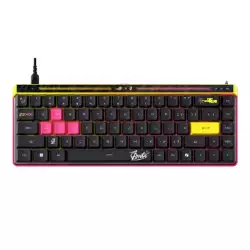
![MADLIONS MAD68 HE RGB ANSI Keyboard [Magnetic Amber Pro] - Black](image/cache/wp/gp/Product_1/12081-250x250.webp "MADLIONS MAD68 HE RGB ANSI Keyboard [Magnetic Amber Pro] - Black")
![[Pro Version] KIWI design Controller Grip Cover with Battery Door Compatible with Quest 2 (Black 1 Pair)](image/cache/wp/gj/gamesworldegypt/accessories/VR%20Image/vrcovernewblack-250x250h.webp "[Pro Version] KIWI design Controller Grip Cover with Battery Door Compatible with Quest 2 (Black 1 Pair)")